
What Is WordPress Hosting? Beginner’s Guide (2026)

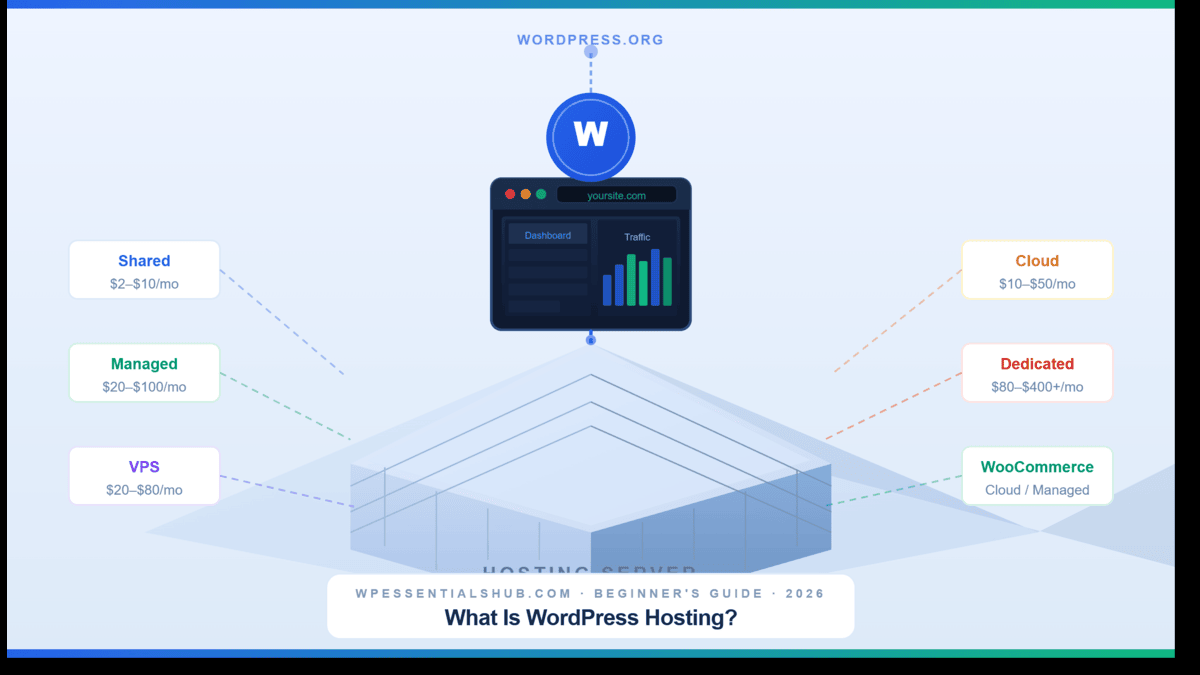
You’ve decided to build a WordPress site — which means you’ll need WordPress hosting. Then the questions start.
“What WordPress hosting do I need?” “What’s the difference between shared and managed?” “Why are prices so different?”
After 8 years of building WordPress sites, I’ve made — and seen — every mistake in the book. This is the complete WordPress hosting guide I wish I had on day one.
| Guide Topic | WordPress Hosting — All Types Explained |
|---|---|
| Hosting Types Covered | Shared, Managed, VPS, Cloud, Dedicated |
| Price Range (2026) | $2/month (shared) to $400+/month (dedicated) |
| Best for Beginners | Shared Hosting — Bluehost or Hostinger |
| Best Overall | Managed Hosting — Kinsta or SiteGround |
| Pricing Verified | June 2026 |
What Is WordPress Hosting, Exactly?
WordPress hosting is a web hosting service specifically optimised to run WordPress websites. The server environment is pre-configured for WordPress — meaning faster load times, tighter security, and less technical work for you compared to generic web hosting.
Without hosting, your website simply does not exist on the internet. No hosting = no website, full stop. According to W3Techs, WordPress now powers over 43% of all websites on the internet — and the performance difference compared to generic hosting is very real.
WordPress Hosting vs. Regular Web Hosting
Here’s something that confuses a lot of beginners: any web host can technically run a WordPress site. So why choose WordPress-specific hosting? The answer is optimisation.
| Feature | WordPress Hosting | Regular Web Hosting |
|---|---|---|
| Server optimisation | ✓ WordPress-specific stack | General purpose |
| One-click WP install | ✓ Always included | Sometimes included |
| Automatic WP updates | ✓ Yes (managed plans) | ✗ Manual only |
| WordPress expert support | ✓ Yes | General tech support |
| Built-in WP caching | ✓ Yes | ✗ Rarely |
| WP-specific security | ✓ WordPress firewall | Generic security only |
| Cost | Slightly higher | Lower entry price |
5 Types of WordPress Hosting Explained
There are five main types of WordPress hosting. Each suits a different situation, budget, and skill level.
Type 1: Shared WordPress Hosting
Like living in an apartment block — you share server resources with many other websites. Cheap and beginner-friendly, but performance has a ceiling.
| Intro Price | $2–$10/month |
|---|---|
| Renewal Price | $8–$15/month |
| Best For | Beginners, personal blogs, new sites |
| Top Providers | Bluehost · Hostinger · SiteGround |
| Free Domain | Usually included 1st year |
Type 2: Managed WordPress Hosting
The full-service option — updates, backups, security, and performance monitoring are all handled for you. The best option for any serious website.
| Entry Price | $20–$35/month |
|---|---|
| Premium Price | $50–$100+/month |
| Best For | Business sites, WooCommerce stores, agencies |
| Top Providers | Kinsta · WP Engine · SiteGround |
Type 3: VPS WordPress Hosting
Virtual Private Server — dedicated resources within a shared physical server. More power and control than shared, without the cost of a dedicated server.
| Price Range | $20–$80/month |
|---|---|
| Best For | Developers, growing sites, WordPress Multisite |
| Top Providers | Cloudways · Hostinger VPS |
Type 4: Cloud WordPress Hosting
Your site runs across multiple servers at once. If one server has an issue, another takes over instantly — resulting in higher uptime and consistent speed even during traffic spikes.
| Entry Price | $10–$50/month |
|---|---|
| Premium Price | $30–$100+/month |
| Best For | Growing sites, WooCommerce, high-traffic blogs |
| Top Providers | Kinsta · Cloudways · SiteGround |
Type 5: Dedicated WordPress Hosting
One server, one website — yours. Maximum performance, maximum control, maximum cost. 99% of people reading this guide will never need dedicated hosting.
| Price Range | $80–$400+/month |
|---|---|
| Best For | Enterprise sites, very high traffic volumes |
WordPress.com vs. WordPress.org — Know the Difference
This trips up almost every new WordPress user. They sound identical. They are completely different products.
✅ WordPress.org (Self-Hosted)
- 100% free, open-source software
- Full access to 60,000+ plugins
- Unlimited theme customisation
- Full monetisation control
- You own your data 100%
- No forced ads — ever
⚠️ WordPress.com (Hosted Platform)
- Plugins restricted on lower plans
- Limited theme customisation
- Monetisation is restricted
- Ads shown on free plan
- Custom domain on paid plans only
- You only partially own your data
| Feature | WordPress.com | WordPress.org (Self-Hosted) |
|---|---|---|
| Hosting included | Yes — on their servers | ✗ You choose your own host |
| Cost | Free to ~$45/month | Hosting from $2–$100/month |
| Plugin access | Limited on lower plans | ✓ Full access (60,000+ plugins) |
| Theme customisation | Limited | ✓ Unlimited |
| Monetisation | Restricted | ✓ Full control |
| You own your data | Partially | ✓ 100% — your server, your data |
| Best for | Casual hobby blogs | Any serious website or business |
How to Choose the Right WordPress Hosting
You don’t need to analyse 50 hosting plans. You just need honest answers to four questions.
| Question | Answer & Recommendation |
|---|---|
| Q1: What kind of site are you building? | Blog/portfolio → shared. Business/store → managed or cloud. WooCommerce → managed with 256MB+ PHP memory. |
| Q2: How much traffic do you expect? | Under 10K/mo → shared. 10K–50K → managed or VPS. Over 50K → cloud premium. |
| Q3: How technical are you? | Non-technical → managed. Comfortable with servers → VPS or cloud. |
| Q4: What is your real budget? | Always check the renewal price, not the intro offer. A $2.99/month plan can renew at $10.99/month. |
WordPress Hosting Technical Requirements (2026)
Before committing to any plan, confirm it meets these standards. Every host we review at WPEssentialsHub is checked against these specs:
| Requirement | Minimum | Recommended (2026) |
|---|---|---|
| PHP Version | PHP 7.4 | PHP 8.2 or higher |
| Database | MySQL 5.7 or MariaDB 10.4 | MySQL 8.0 / MariaDB 10.6+ |
| HTTPS / SSL | Required | Free SSL included as standard |
| PHP Memory Limit | 64MB | 256MB–512MB |
| WordPress Updates | Latest stable release | Auto-updates preferred |
Which Hosting Type Is Right for Your Situation?
| Your Situation | Recommended Type | Our Reviewed Provider |
|---|---|---|
| First blog, tight budget | Shared WordPress Hosting | See cheap hosting picks |
| Small business website | Managed WordPress (entry) | Hostinger Review |
| WooCommerce store | Managed or Cloud Hosting | Best Managed Hosting |
| Developer or agency | VPS or Cloud Hosting | Cloudways Review |
| Enterprise / high traffic | Dedicated or Cloud Hosting | Best WP Hosting 2026 |
6 Beginner Mistakes to Avoid When Buying WordPress Hosting
This is the section most hosting guides skip entirely. I’ve made some of these mistakes myself over 8 years of building WordPress sites.
Common Mistakes Beginners Make
WordPress Hosting Cost in 2026
Here’s a realistic breakdown of what you’ll actually pay — including renewal pricing that most comparison sites leave out.
| Hosting Type | Intro Price | Renewal Price | Best For |
|---|---|---|---|
| Shared | $2–$5/month | $8–$15/month | Beginners, blogs |
| Managed (entry) | $15–$25/month | $20–$35/month | Small business |
| Managed (premium) | $30–$100/month | Same rate | WooCommerce, agencies |
| VPS | $20–$80/month | Same rate | Developers |
| Cloud (entry) | $10–$30/month | Same rate | Growing sites |
| Dedicated | $80–$400+/month | Same rate | Enterprise |
| Domain name | ~$12–$20/year after first-year free offer |
|---|---|
| Premium theme | $0 (free) to $99 one-time or $49–$99/year |
| Premium plugins | $0 to $200+/year depending on your needs |
| Email hosting | Some hosts include it; others charge ~$2–$5/month |
| Total first-year estimate | $50–$120 for most beginners (hosting + domain) |
Frequently Asked Questions About WordPress Hosting
| Question | Answer |
|---|---|
| Do I need WordPress hosting to use WordPress? | You need some form of hosting. WordPress-specific hosting gives you better speed, security, and support from day one. |
| What is managed vs. unmanaged hosting? | Managed = host handles updates, backups, security for you. Unmanaged = you handle everything yourself. |
| Is WordPress hosting good for beginners? | Yes — one-click install, intuitive dashboards, automatic updates. No server knowledge needed. |
| How much does WordPress hosting cost per month? | $2–$5/month for shared. $20–$100+/month for managed. Always check the renewal price. |
| Can I switch hosting providers later? | Yes — most managed hosts offer free migration. Plugins like Duplicator or UpdraftPlus also help. |
| Is WordPress.com hosting free? | A free plan exists but with ads, no custom domain, and restricted plugins. Not viable for serious sites. |
| Best WordPress hosting for beginners in 2026? | Bluehost or Hostinger for budget. SiteGround GrowBig for managed. Kinsta for WooCommerce stores. |
| How do I access WordPress after setup? | Log in at yoursite.com/wp-admin — your host emails you the credentials after installation. |
| Do hosts offer money-back guarantees? | Yes — most reputable hosts offer 30-day money-back guarantees. Domain fees are usually non-refundable. |
Which WordPress Hosting Should You Choose?
Just starting out? Shared WordPress hosting from Bluehost or Hostinger gives you everything you need at a price that makes sense. Upgrade later as your site grows.
Building a business site or store? Start with managed WordPress hosting — Kinsta or SiteGround. The extra cost buys reliability and expert support that pays for itself the first time something breaks at 2am.
Developer or agency? Cloud hosting through Cloudways or Kinsta gives you the performance and flexibility to scale without hitting ceiling limits.
The single most important rule: Always check the renewal price, not just the intro offer. That one habit alone will save you from the most common beginner mistake in WordPress hosting.
WP Essentials Hub — Your Complete WordPress Essentials Hub
I’m Shamim Sarker, the founder and lead reviewer at WP Essentials Hub — a dedicated WordPress toolkit review site where I help website owners, bloggers, and developers find the right tools to build, grow, and secure their WordPress sites.
With 8+ years of hands-on WordPress experience, I’ve personally built, tested, and troubleshot hundreds of websites. I cover themes, page builders, plugins, hosting, domains, coupons, and deals — all tested on live WordPress sites with my own money. No paid placements. No vendor influence. Just real testing and real results.